Skip to Content Skip to footer
To see content specific to your location, return to the country or region that matches your location.

Your satisfaction is our goal.

Kensington aims high — from the quality and value of our products to the service and support we provide our customers. Here’s everything you need to set up your new SD2500T docking station.

How can we help?

Have a question about your SD2500T docking station? Need guidance with setup? Want to chat with a Kensington docking solution specialist? Just scroll and select the resource you need.

Connect with a Kensington product specialist.

circle-talk-human.jpg

Phone:
1300 881 931

circle-email-human.jpg

Asistencia técnica:
Página de asistencia

Man using tablet

Live chat:
Click the Live Chat tab on the right
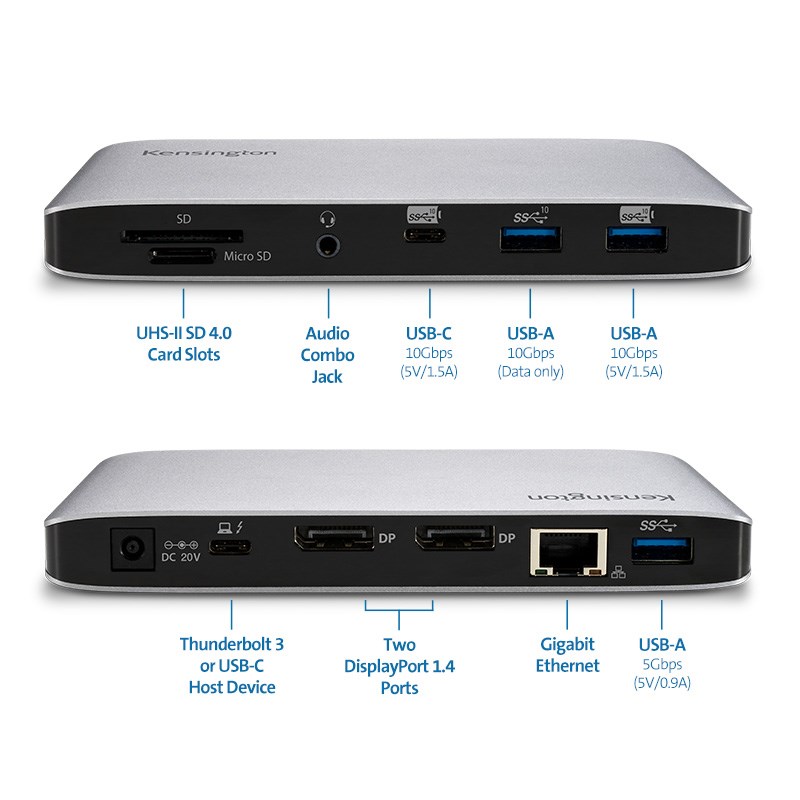
k36400na-callouts.jpg

Need guidance with setup?

Have a question about your SD2500T docking station? Need guidance with setup? Want to chat with a Kensington docking solution specialist? Just scroll and select the resource you need.
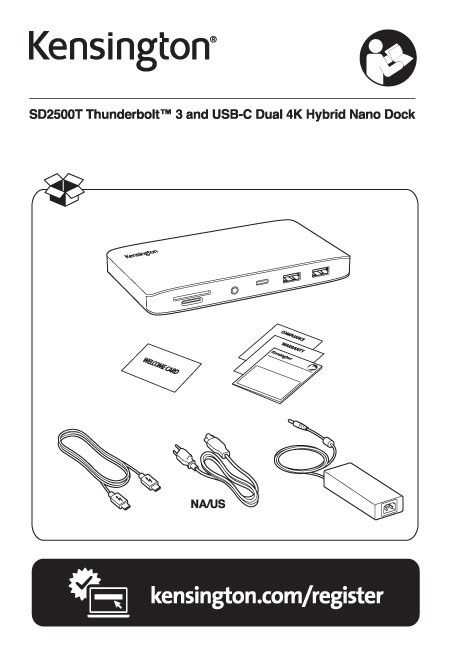
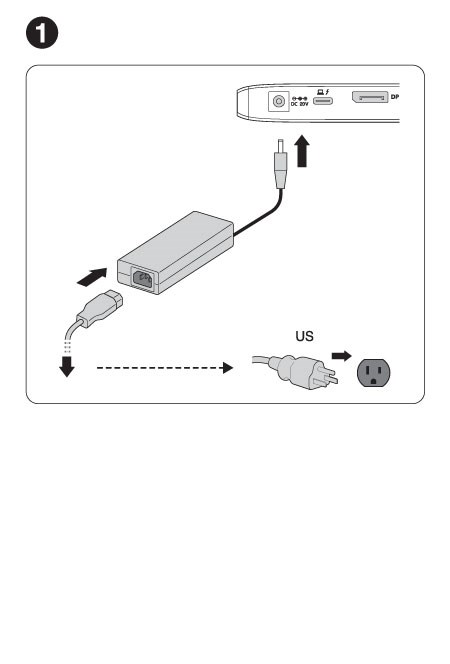
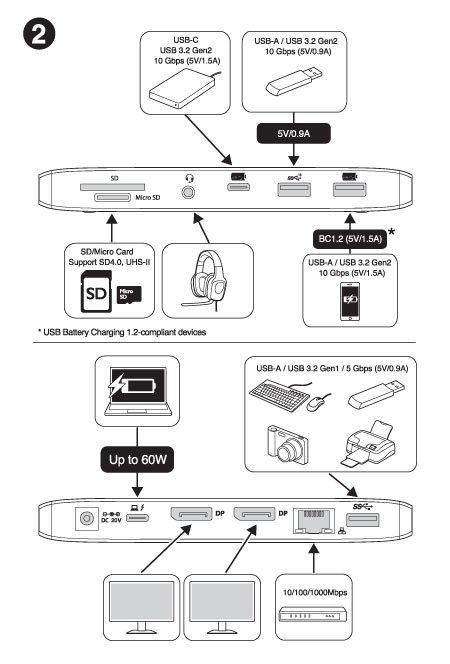
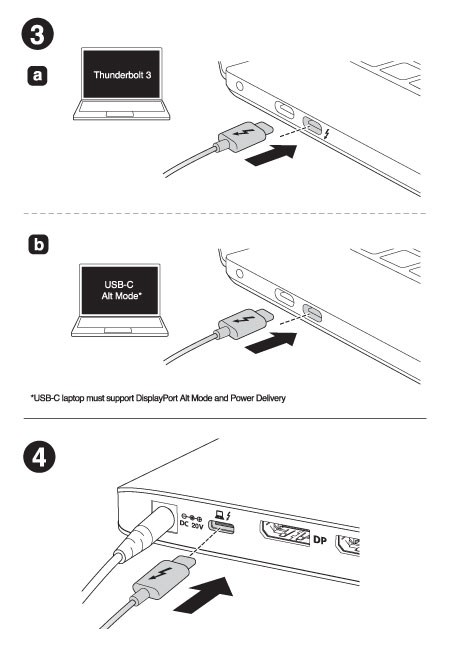
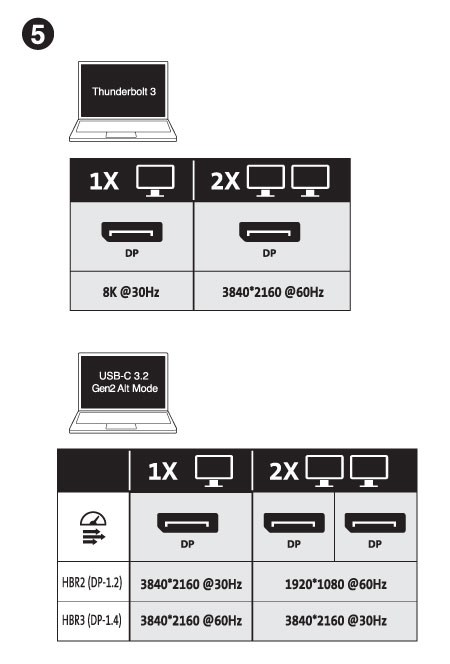
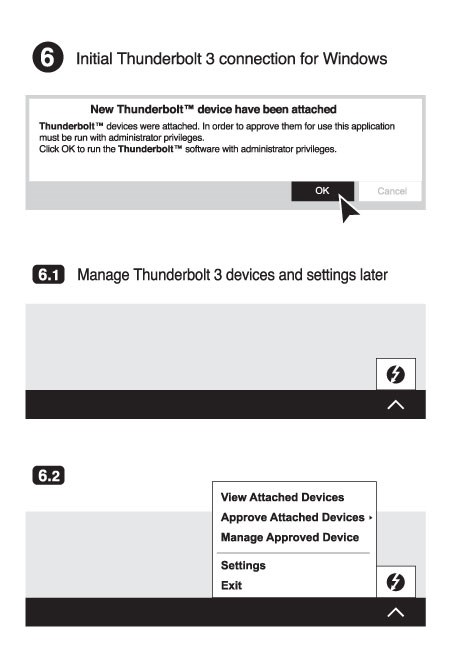
sd2500T-guide-1.jpg

sd2500T-guide-2.jpg

sd2500T-guide-3.jpg

sd2500T-guide-4.jpg

sd2500T-guide-5.jpg

sd2500T-guide-6.jpg

SD5780T setup guide page seven

SD5780T setup guide page eight

k36400na-environment.jpg

FAQs

  • Q: Do all Thunderbolt 4 desktop docking stations support USB-C laptops as well? 
  • Q: Can my M1/M2 Base Chipset Macbook supports dual displays?
  • Q: Is this dock compatible with laptops that can only connect via a USB-A port? 
  • Q: Does this dock require driver installation? 
  • Q: Does this dock support USB Power Delivery (PD)?
  • Q: What if my device has a USB-C port but it doesn’t support Power Delivery (PD)?
  • Q: How many monitors does the dock support and what are the max resolution supported?
  • Q: My computer supports dual-monitor extended mode, but there is no display on the 2nd monitor.
  • Q: Does the dock support fast-charging for my phone?
  • Q: Can I use other USB-C or Thunderbolt 3 cables (not from the original box) on this dock?
  • Q: Will this dock work with Kensington’s DockWorks software?
  • Q: My Mac system included an 87W power adapter, will this dock still charge my system?
  • Q: Will this dock work with Kensington’s DockWorks software?
Q: Do all Thunderbolt 4 desktop docking stations support USB-C laptops as well? 

A: Yes, however USB-C laptop supports single display vs thunderbolt laptop supports dual displays, solutions from Kensington are designed and tested with a wide array of devices to ensure the best possible compatibility with your laptop; regardless, if it supports Thunderbolt 4.

Q: Can my M1/M2 Base Chipset Macbook supports dual displays?

A: No, M1/M2 Base Chipset supports only a single external display. (Only M1/M2 Pro, M1/M2 Max, and M1 Ultra Chipset supports dual displays).

Q: Is this dock compatible with laptops that can only connect via a USB-A port? 

A: No  

Q: Does this dock require driver installation? 

A: With macOS and Windows 10 and 8.1, the operating system will download and install the necessary drivers automatically. Please be sure your Intel Thunderbolt software is installed. For more details see https://thunderbolttechnology.net/updates

Q: Does this dock support USB Power Delivery (PD)?

A: Supports USB-C PD 3.0 (96W of laptop charging)

Q: What if my device has a USB-C port but it doesn’t support Power Delivery (PD)?

A: Unfortunately, charging will not be supported then. However, data and video functionality will still be supported.

Q: How many monitors does the dock support and what are the max resolution supported?

A: Two monitors: Single 8K (@60Hz)* or Single 4K (@120Hz) / Dual 4K (@60Hz) or Dual 1080p (@240Hz) *(Host with DSC 1.2 HBR3) (Only M1/M2 Pro, M1/M2 Max, and M1 Ultra Chipset supports dual display)

Q: My computer supports dual-monitor extended mode, but there is no display on the 2nd monitor.

A: Sometimes the 2nd monitor will not automatically be displayed. You may have to use the Intel, Nvidia, or other compatible graphics card settings application to ‘unhide’ the second monitor.

Q: Does the dock support fast-charging for my phone?

A: Yes, the front one USB-A 3.2 Gen2 10Gbps (5V/1.5A) charging port

Q: Can I use other USB-C or Thunderbolt 3 cables (not from the original box) on this dock?

A: No, we can only guarantee the Kensington cables shipping with the dock would work. USB cables can vary greatly between different
manufacturers. We recommend users to contact Kensington for replacement if needed.

Q: Will this dock work with Kensington’s DockWorks software?

A: Yes

Q: My Mac system included an 87W power adapter, will this dock still charge my system?

A: Yes, this dock supports up to 96W of charging, making it a great solution for the latest MacBooks

Q: Will this dock work with Kensington’s DockWorks software?

A: Yes, however, please visit https://www.kensington.com/dockworks/ for a complete list of the docking stations that are compatible with DockWorks.

We are here for you!