

ExpertMouse™ TB800 EQ Trackball was designed to deliver precise, customizable control for a wide range of users and workflows. Since launch, we’ve received valuable feedback from the trackball community — and we want to be clear: we’re listening.
Some users have reported a potential gap in sensor coverage when interacting with the ball between approximately the 10–2 o’clock positions. While this isn’t the most common way the trackball is used, we recognize that grip style, hand size, and positioning vary, and this behavior may affect certain users.
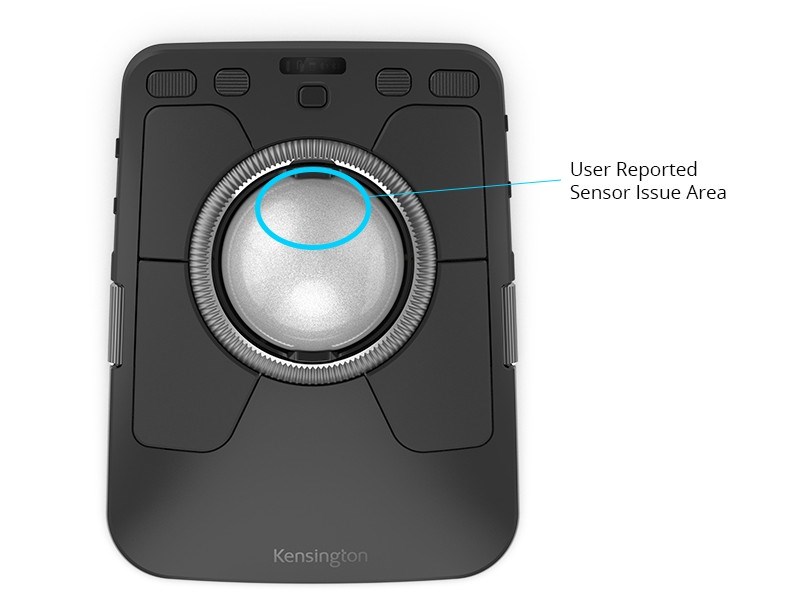
Our engineering teams are actively evaluating firmware, sensor calibration, and software options to determine what improvements may be possible. Any updates will be carefully validated to ensure they enhance performance without unintended tradeoffs.
We appreciate the feedback and will continue to share updates as we learn more. Kensington remains committed to delivering reliable, high-performance input devices shaped by real-world use.
— The Kensington Product & Engineering Team
Having an issue with your TB800 EQ ExpertMouse™ Trackball? Please see curated FAQ’s below for more answers.
1. Is my TB800 EQ defective?
No, not necessarily. Many users are experiencing normal performance and using TB800 EQ as intended. The behavior being discussed relates to how the device responds to specific interaction styles, rather than a clear hardware failure. That said, we’re evaluating all feedback carefully.
2. What is Kensington doing in response to this feedback?
We’re committed to supporting our customers and ensuring a positive experience with the ExpertMouse TB800 EQ Trackball. Based on the feedback we’ve received, our teams are actively:
- Evaluating firmware-level tuning options and potential updates
- Reviewing sensor calibration and overall tracking behavior
- Exploring software enhancements that may offer additional user-selectable tracking profiles
If you’re not fully satisfied with the performance of your TB800, we want to be sure you have clear options and support:
- Extended returns Purchases made on the US Kensington.com of the TB800 are now eligible for a 90-day return window, giving you more time to evaluate the TB800 in your everyday workflow.
- Extended warranty The ExpertMouse TB800 EQ Trackball is now covered by a 5-year limited warranty, extended from the previous 3-year coverage.
We also encourage you to share your experience directly with us. By completing this brief feedback form about your hardware or software experience (https://kensington.formstack.com/forms/feedback), you help our support and product teams better understand your feedback and determine the most appropriate next steps, based on your preferences and location.
Any potential updates will be carefully validated to ensure they deliver meaningful improvements while maintaining the overall quality and reliability you expect from Kensington.
3. Will there be a firmware or software update?
There is currently a new firmware update available to decrease the insensitivity area. You can find out more details by going to New Firmware Update for Kensington ExpertMouse™ TB800 EQ Trackball: Improved Cursor Stability. We are currently assessing what updates make sense within the TB800 EQ design and performance goals. If additional new firmware or software updates are released, they will be made available through official Kensington channels, including Kensington Konnect and our support site.
4. When will updates be available?
At this time, we don’t have a specific timeline to share for future updates beyond the firmware update that is available to try now. Our priority is to ensure that any updates are meaningful, stable, and aligned with the overall design intent of the product before release.
5. Is this something that can be fully resolved through software?
Trackball performance is influenced by a combination of hardware design, firmware behavior, software settings, and individual usage style. Some improvements may be possible through firmware or software tuning, and we are actively investigating those paths.
6. What can I do right now to optimize my experience?
We recommend:
- Trying slight adjustments to hand position and ball movement style, as trackball interaction can vary significantly
- Ensuring your device is running the latest version of Kensington Konnect™
- Experimenting with pointer speed, acceleration, and button mappings
Our support team can also help walk through configuration options if needed. Contact Support
7. What if I’m unhappy with the performance?
If your experience with the TB800 EQ isn’t meeting your expectations, our support team is here to help. We encourage you to complete this short form so we can better understand what you’re experiencing.
Your feedback allows us to review your situation more closely and determine the most appropriate support or resolution options, based on your location. We’re committed to working with you to ensure you feel supported every step of the way.
If you are located outside the US and unhappy with the TB800 performance, please contact Kensington customer support.
8. Is Kensington listening to community feedback?
Yes. We actively monitor feedback from customers, reviewers, and enthusiast communities. Detailed, constructive input from users plays an important role in how we evaluate enhancements and future updates.
9. Where will Kensington share updates?
Any official updates will be shared via:
- Kensington.com (Support & Product pages)
- Kensington Konnect software notifications
- Direct communication with registered product owners
Thank you for being part of the Kensington community. We appreciate your feedback and patience as we continue to evaluate ways to refine and enhance the TB800 EQ experience.